I originally started this project because I wanted a better way to track changes between versions of pinball games. Somewhere between building an asset browser and trying to make sense of compiled game code, I ended up finding a few odd assets which didn’t belong to the licensed IP of a table I was exploring. A few Google searches later and I have found a few button combinations on the internet.
For example, here is the “Cats of Stern” easter egg from King Kong:
Testing out the codes I found online was fun, but I wanted to find more. Since I was already working on comparing the binaries for code changes I decided to poke around and search for more. Eventually I found out that most Stern titles all share the same button-combination easter egg system. I’ve put those into a searchable pinball Easter egg index, with a little cabinet illustration that shows you how to enter them, but I wanted to write about how I got there because the process was a bit more involved than searching a binary for the word “easter.”
The index currently lists over 40 tables, including recent releases from all of the SPIKE generations. There are some actual Easter eggs in there, and also some shortcuts that appear to have been left for technicians and developers, which became particularly obvious once I started testing the codes in my Pokémon emulator.
As of October 2026, I did not find any signs of easter eggs in SPIKE 3 games.
It’s possible they are in a different region of the program that I’m unaware of, or they may not exist yet at all.
I just wanted to compare some releases
When a new version of a pinball game comes out, the release notes are useful, but they only tell you about the changes somebody decided to write down. I wanted to be able to compare the actual releases, see which images, sounds and scripts had changed, and eventually look at the executable itself to see whether there were unmentioned changes or hints of upcoming features.
That turned into a tool for importing game releases, browsing their assets, grouping similar images and comparing versions. The screenshot below is the asset browser looking through a Dungeons & Dragons release, you can see the import, catalog and function-signature tabs along the top.
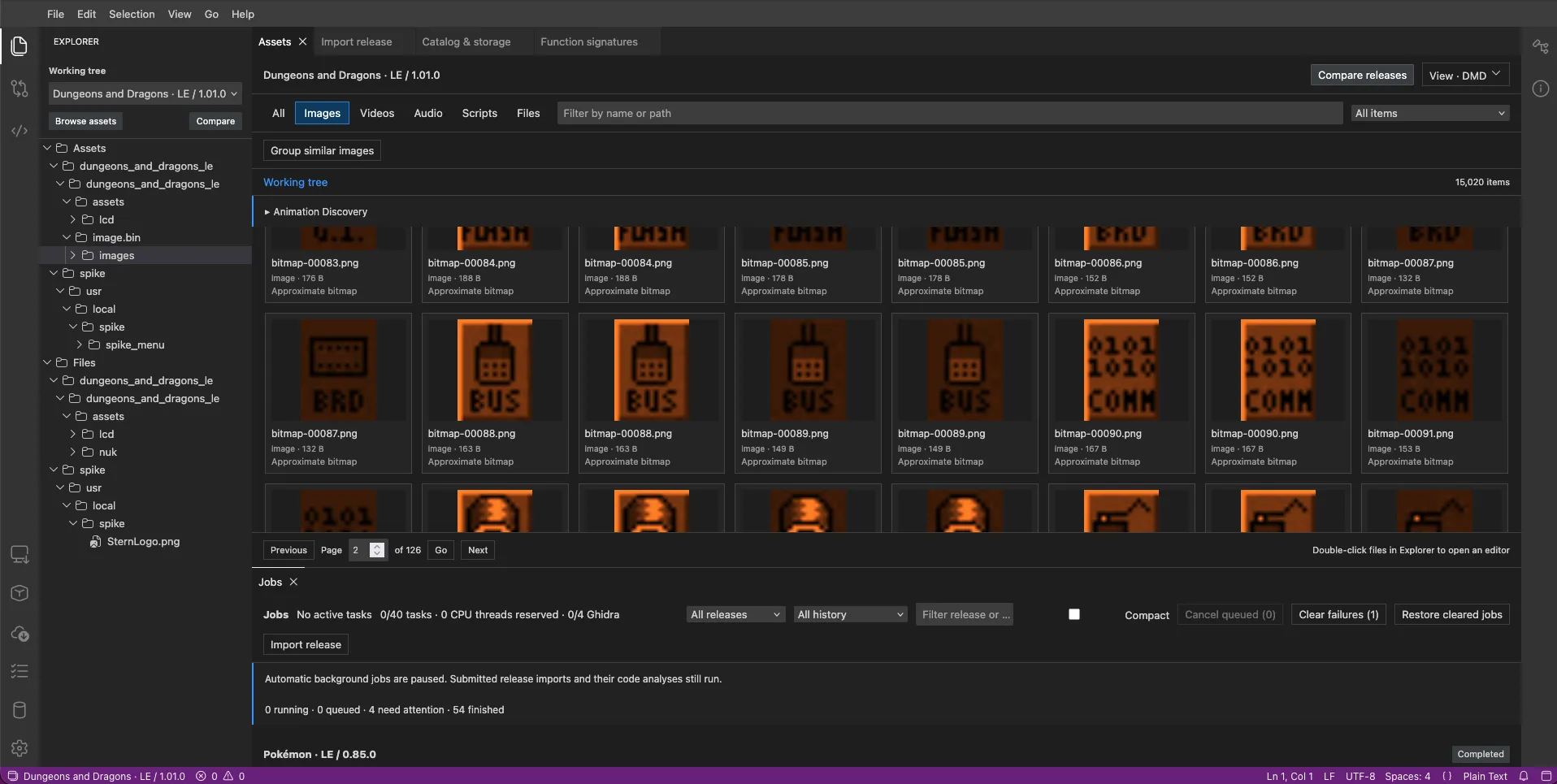
The asset browser in my currently unreleased version-tracking tool. A lot of the interesting changes are easier to spot once you can put similar assets next to each other.
Being able to compare the artwork is helpful, however, an image being present doesn’t tell you whether the game actually uses it. It might belong to an older feature, something still under development, or a screen that only appears under a condition I haven’t figured out yet. Also, a change to scoring or game logic doesn’t necessarily require a new image at all, so I wanted to go deeper than the asset comparison and start tracking changes in the code.
That is where this gets a tad more difficult. A byte-for-byte comparison can tell you that two executables differ, but it doesn’t necessarily explain why, and moving a function to a different address can change a lot of references without changing what that function does. I wanted a way to recognize the same pieces of code between builds in a mostly painless way.
Starting with one game that still had names
I had come across a github repo where somebody had found symbols for Teenage Mutant Ninja Turtles, which gave me a starting point for understanding the SPIKE 2 software. Having those names was helpful, but having symbols for one game and one game only sucks when you’re trying to compare a whole collection of games, so I decided to see if I could find more myself. I will mention the repository that these Ghidra databases originated from does have more useful information on extracting and emulating pinball games from modern machines. I think it’s kind of funny that me and a friend have been working on this for months, and on another part of the world another guy is doing the same thing, it’s a small world.
If you haven’t worked with a compiled executable before, symbols are essentially labels attached to things in the program. Without them, you might be staring at a function at some address and trying to figure out what it does from its instructions, with symbols, that same function might already have a useful name. It is a bit like getting a wiring diagram with the connectors labeled, you still have to follow the wires, but at least you have a better idea of where to start.
Also, “symbols” and “debug information” aren’t quite the same thing. A static symbol table can give you function and object names, while more complete debug information can describe types, source files, line numbers and the relationship between the compiled program and those source files. All of the ROMs I have taken a look at were all Linux-based, meaning the game binaries use the familliar Execuable and Linking Format (ELF) that many developers are familliar with.
Those extra details provided by the ELF can make a decompiler much easier to read, however, they still don’t give you the original source file back. Comments, formatting and the author’s original expressions will be missing, and optimized code may look quite different from the original source files.
Looking through the archived firmware
I found a large collection of Stern update packages and SD-card images on Internet Archive (IA), spanning multiple generations, and wrote a script to extract the game executables and check them for symbols and debugging information. The thing I was interested in was the compiled game program inside each release, so this was a scan of those executables, rather than every program or asset on every version, although I will mention those may be subject to interest as well.
Some packages contained the same binary as others, and some failed to process, so I kept the extraction results separate from the set of files I could actually work with.
Once that was sorted and deduped, my comparison catalog contained 325 distinct readable game executables. These are the figures I ended up with:
| What I counted | Result | What it means |
|---|---|---|
| Firmwares found on IA | 721 | SD Card images, OTA/USB update bundles. |
| Distinct readable game executables | 325 | Unique extracted binaries |
| Executables retaining static symbols | 138 | Names were still available in a static symbol table |
Executables containing .debug_info | 75 | DWARF debug information was present, though its coverage varied |
The 75 binaries with .debug_info are about 23% of the final catalog, but
that number needs a little explanation because I initially thought finding a
debug section would be enough. A game can include debug information for its
C/C++ runtime or startup code while having none for the actual pinball rules or
the shared Stern engine, so a large debug section doesn’t necessarily mean you
have a particularly useful game to reverse engineer.
I had to look at what the debug information described, rather than just how many bytes it occupied. A compilation unit is a block of debug information associated with a compiled source unit, and its source paths and recorded names gave me a way to tell whether I was looking at game code or a library that happened to be linked into the program.
Game of Thrones was the interesting one
Game of Thrones 1.10 was the standout, with 622 indexed compilation units and debug information covering game and shared-engine code. The recorded compiler options included:
-O0 -fno-inline -g -ggdbEssentially, that describes a build with optimization disabled, inlining disabled, and debug information included for use with GDB, which is a debugger. For this kind of investigation, that is a pretty useful combination because the compiler hasn’t done as much rearranging or combining of the code before you get to read it.
I found this executable in a publicly archived release package, which is quite an interesting thing to find in a release collection, however, I can’t establish from the package alone why it was built that way or how many physical machines ever ran it. It also remained the only binary I had confirmed as carrying game/engine DWARF coverage, so I don’t want the figure of 75 debug-bearing files to imply that I found 75 equally complete sets of game debug information.
The most useful named baselines were older releases, from before the Insider Connected era. Later game executables with Insider Connected integration were generally stripped in the collection I checked, which means those useful names had been removed, however, the older releases were still enough to help me understand how the shared software was organized.
Using an older game as a map
A baseline here is just an older build whose functions I already understand, which I can use as a reference while looking at another release. Different games have their own rules and assets, but they also share a lot of machinery for handling cabinet inputs, displays and diagnostics, so a useful name in one binary can give me a lead in another.
That doesn’t mean I can copy an address from Game of Thrones into Pokémon and expect it to point at the same thing. Addresses change between builds, and the implementation or surrounding data can change too, so I still have to inspect the corresponding code in the target game. Also, matching a name between two symbol-bearing games tells me that the identifier was retained, it doesn’t establish that the two functions behave identically.
For version tracking, this is the part I was interested in building toward, recognize the same function across releases, then compare its behavior rather than getting distracted by every changed address. For the Easter eggs, it gave me something much more specific to follow: the code that processes flipper presses and decides whether they match a hidden sequence.
Now let’s get into the hidden codes
In a game that still had symbols, there was an array named
easter_egg_table_data, which is a fairly helpful name when you’re looking for
Easter eggs! Each entry connected a sequence of three counts to a callback,
which is the function the program calls when that sequence matches.
The counts and the function aren’t necessarily sitting next to each other as readable text. The record contains pointers, which are addresses of other data or code, so one field points to the three count bytes and another points to the function to run. The layouts I checked also had a flags field, and the record size was 12 bytes in the 32-bit layout or 24 bytes in the 64-bit layout (SPIKE 3), including the alignment padding in the latter.
You can think of each entry as a row in a little address book:
| Field | What I follow it to |
|---|---|
| Code pointer | Three count bytes, such as 6, 14, 6 |
| Callback pointer | The function invoked when those counts match |
| Flags | Additional entry data whose meaning needs checking in that build |
Once I knew what that structure looked like, I didn’t need every game to retain the name of the array. I could look for the shape of the table instead, then follow the pointers and make sure the proposed records actually made sense. That is the heuristic detection part of the project, it uses a collection of structural clues rather than assuming a particular address or symbol exists.
Making sure the scanner wasn’t just finding random bytes
The script first used the named table when it was available, and otherwise looked for a descriptor containing a table pointer, a record count and the expected record size. It then checked the records themselves, including the initial zero-count entry with a null callback, readable pointers to count data, plausible count values, and callback addresses that pointed into executable sections of the binary.
Those checks matter because finding 6, 14, 6 somewhere in a multi-megabyte
file doesn’t establish that it’s a code. It could just be unrelated data, and
three plausible counts by themselves don’t tell you whether any code ever reads
them. A consistent series of records, all pointing to readable data and code,
gives me a much better candidate to investigate.
The letter sequences can be misleading if you get too excited about them. My index has the letter conversions for each code, but a readable word is a memory aid is not enough to name every code from three letters.
The flippers are a two-button keyboard
Once you follow the input code, the way the sequences work is pretty easy to picture. In the shared dispatchers I traced, pressing both flippers clears the input buffer, pressing the left flipper increments the current count, and pressing the right flipper moves to the next count. After the three counts, one more right-flipper press submits the sequence.
For 6-14-6, that gives you:
Both flippers together, then release
Left 6 times, then Right
Left 14 times, then Right
Left 6 times, then Right
Right once more to submit
You’ll want to release between individual presses, and enter the sequence while
the machine is on its attract screen, between games. Also, the numbers are
counts, not decimal digits, so the 14 in the middle means fourteen left-flipper
presses rather than a one followed by a four.
Many of these sequences map to letters using A=1 through Z=26, which makes
them a lot easier to remember. 6-14-6 spells FNF, 4-9-1 spells DIA,
and 3-1-20 spells CAT. The table code is still comparing numbers, but from
the player’s perspective you’re essentially typing a three-letter word on
a keyboard with only two buttons.
The illustration on the index starts with that King Kong example, and you can load another code using its demo button. I wanted something you could pause and step through, particularly when a code asks you to press the left flipper twenty times, without needing to reproduce the game’s actual artwork. The common entry pattern is illustrated for the other codes, but the start, finish, timing and eligible game modes still need testing on each title.
Several of the codes shared between games turned out to look more like service tools than Easter eggs, so I separated those into sections at the bottom of each game’s listing.
This is an brief list of the common service codes I observed:
| Code | Letter hint | What happened when I tried it |
|---|---|---|
| 6-14-6 | FNF | A DMD-like status screen shows <fatal errors>/<non-fatal errors> - <sum> |
| 8-4-7 | HDG | Board Information, including serial number and game software information |
| 2-2-2 | BBB | What appears to be a debug function to reload a game state saved before a process crash |
| 4-9-1 | DIA | Turns on error reporting on the screen (TODO DBL CHECK) |
2-2-2: recovery data, but what is being recovered?
One of the first things I tried was the 2-2-2 code, it was an easy one to perform, and it only appeared in some of the titles. I will mention there are other codes that I haven’t tested when I initially wrote this that were very similar like ABC or CCC.
I decided to try the BBB code I discovered on Pokemon, the resulting message confused me.

My first thought on seeing “No Game Recovery Data Found.” was that it might
have something to do with recovering a failed update or rolling back from a newer one (similar to Android’s A/B partitions).
That was a guess based on the wording of the screen, however,
following the actual callback led to an object named RecoveredScoresOverlay,
which gave me a much more specific lead.
The renderer references “Game Recovery Data Found:”, player scores, “Current Player:” and “Current Ball:”, so this is a screen for saved game/score information. The path I traced doesn’t select a firmware image, install an update or copy the scores back into an active game, entering the code requests an information overlay.
The saved information comes from /dump/scores_backup.txt, which despite
the .txt extension contains a 48-byte binary record. If you’re curious,
the little-endian layout is:
| Offset | Size | Saved value |
|---|---|---|
0x00 | 1 byte | Presence flag, with bit 0 used to decide whether data is available |
0x01 | 3 bytes | Padding, zeroed by the writer |
0x04 | 4 bytes | Player count |
0x08 | 4 bytes | Current player |
0x0c | 4 bytes | Current ball |
0x10 through 0x2f | 32 bytes | Four 64-bit player scores |
The loader reads that record during initialization, and only an exact 48-byte
read is copied into its cache. When you enter 2-2-2, it uses the cached record,
it doesn’t open the file and reread it for each code entry. A missing or short
record, or a record whose presence bit is clear, can therefore produce the
empty-data message I saw.
With no available data, the overlay is set to display for about five seconds, while the populated branch is set to display the saved information for about sixty seconds, including up to four player scores and the saved player/ball values. I have observed the empty message, but the populated screen and those durations are findings from the code rather than a completed runtime test with a populated recovery record.
Also, the overlay has game-state and display-context checks, so having a record doesn’t mean it will show in every context. Re-entering the code while it is already visible doesn’t directly restart the timer either, it sets a request that can remain pending until the overlay returns to its idle state.
The backup writer is called from signal/error-exit paths and other exit or shutdown-like paths, which supports the idea that this is a recovery aid for information from an interrupted game. There is a separate routine that clears the record, however, I haven’t assigned the gameplay event responsible for that call, so I can’t tell you that it follows a particular new-game or game-over clearing rule.
Showing the overlay doesn’t itself save, clear or restore anything, and the
writer I inspected doesn’t check its write result or call fsync, so I also
can’t promise that a record survives every possible failure. This feature
seems to be designed for debugging, but there’s a fair chance I may be misunderstanding it.
4-9-1: why the screen can stay quiet
4-9-1 was the other confusing result, because I couldn’t get it to show
anything and wondered whether it needed the coin door open. Its callback in
Pokémon sets an enable flag, rather than immediately drawing a screen or
playing a confirmation sound, so the next step was to find what actually checks
that flag.
The node-diagnostics path checks whether reporting is enabled, whether the selected node has a diagnostics record, and whether the selected error count is nonzero. The display routine returns immediately when that eligible count is zero, so a recognized code can leave you looking at exactly the same screen when there aren’t matching errors to report.
There was also a useful named comparison in Game of Thrones, where the path
through sys_diagnostics_show, sys_node_diagnostics_show and the diagnostic
error-count routines follows the same enable-flag pattern. The actual flag
number differs between the builds, which is another reason not to copy
constants from an older binary without checking the target.
I didn’t find a coin-door predicate in the callback or the error-count/display path I traced, however, that doesn’t settle every upstream input or scheduling condition. Also, the silent result from my emulator attempt alone doesn’t prove that I entered it successfully, a runtime breakpoint at the callback would distinguish an accepted-but-silent code from a sequence that never reached it. For the index, the useful description is that it enables diagnostic error reporting without a confirmation screen or sound, rather than suggesting that it always opens a menu.
Turning the research into something you can actually use
The initial research index ended up with 67 selected binaries across 43 games before combining duplicate entries from different editions and leaving out likely placeholders.
The repeated numbers also need a little care. The named Game of Thrones and
Ghostbusters tables call 1-2-3 game credits, so I haven’t moved every instance
of that code into the service section. 2-2-2, on the other hand, leads to the
recovered-score overlay in other tables like Pokémon. My database has an check for codes
whose purpose/effect might be shared across titles.
For the public page, I wanted to keep the useful part straightforward, search for your game, look at its numeric codes and letter translation, then load a sequence into the illustration if you want help entering it. Most of these entries still need to be tried and documented, so if you know what some of these codes to or you have a correction, please email me! My email can be found on the homepage.
The pinball Easter egg index is where I’ve put the sequences you can try, and the version-comparison tool is still what led me into this in the first place.
Where this could go next
Everything researched so far have been SPIKE generations, which is where having a linux-based OS made things fairly easy for me since I was in famillar territory. The obvious next step is going back into older Stern generations, and eventually seeing whether other manufacturers have something similar.
Targeting a new platform isn’t as simple as pointing my scanner at a different pile of files. The scanner relies on a few things that happen to be true for the games I’ve looked at so far: the executables are ELF files, so I know where the code and data sections are, some of them still have symbols, and the Easter egg table has a consistent record layout I can recognize. I am aware that some binary formats of older embedded platforms may contain symbols too, but back when space constraints were tighter, it wouldn’t surprise me to hear they would’ve stripped symbols too, and we’re just talking about games that were written in the last ~20 years, older games were written in assembly and I have zero experience in that area, for now…
For a new platform I’d need to work through everything again, starting with getting the program out of the update package or ROM images, figuring out the processor and where the program is loaded in memory, and then finding the input handling without any names to lean on. It’s very possible there’s no egg code table at all, and the codes are checked differently.
The input handling is the part I’d expect to take the most time. On SPIKE, I could follow a named function from Game of Thrones into a stripped game, on an unfamiliar platform I’d likely be starting from the switch inputs and working my way up to whatever decides a sequence matched.
SAM seems like a fair candidate
Stern SAM, the platform before SPIKE, is probably where I’ll look first. SAM was Stern’s first C++ platform, so I suspect a fair amount of the shared engine code, and possibly the Easter egg system itself, started there and was carried forward. If that’s the case, the table layout and the flipper dispatcher might look familiar, even if the code around them doesn’t.
The catch is that SAM games aren’t Linux programs, as far as I know they’re raw ROM images rather than ELF executables, so I’d lose the section information and almost certainly the symbols. I’d need to work out the memory map before any of the heuristics from earlier would be useful. PinMAME already emulates SAM though, meaning a fair amount of this guess work can be learned from their code.
Other manufacturers are a much bigger jump. Jersey Jack, Spooky, American Pinball and the others all have their own software, so nothing about Stern’s table layout would carry over, and I’d be starting more or less from the beginning, assuming they have hidden codes at all.
A note on the legal side
If you’re interested in digging into the firmware yourself, there are a few legal details worth understanding first. David Vanderburgh’s Pinball Asset Decryptor legal guide was a useful starting point for this section, although the work here is about documenting game behavior and hidden codes. I’m not a lawyer, and this post isn’t legal advice.
This is independent hobby research, with no affiliation with or endorsement from Stern Pinball or the other rights holders. Game names and trademarks belong to their respective owners and are used here to identify the games I’m discussing. The screenshots illustrate research, they don’t give anyone permission to reuse the games’ artwork, music or code. This post and the index don’t provide firmware downloads, decryption keys or extracted asset packs.
In the U.S., fair use can cover limited use of copyrighted material for commentary and research, but it depends on the circumstances. Owning a machine or doing the work as a noncommercial hobby doesn’t automatically settle that question. If encryption or another access control is involved, the DMCA’s Section 1201 rules raise a separate issue. Exceptions for activities such as repair and interoperability have specific conditions, so I wouldn’t assume that hunting for Easter eggs qualifies, or that fair use alone permits bypassing a protection. Not to mention, many folks do similar “datamining” efforts on other games like the work published on The Cutting Room Floor.
There are also the manufacturer’s license terms to consider. Stern’s published EULA includes restrictions on reverse engineering, modifying the software and defeating security measures, and warns that unauthorized software or content may leave a machine unusable or without access to its online network. Whether particular terms apply or are enforceable depends on your situation and jurisdiction, this writeup doesn’t resolve that for you.
Trying a flipper sequence on a machine you have permission to use doesn’t require extracting or modifying its firmware. If you go further into the research side, use lawfully obtained software, check the applicable terms and local law, and get qualified legal advice if you’re unsure. Also, as the service codes above show, a hidden sequence isn’t necessarily just a funny picture, so check what a code does before trying it on somebody else’s game.

Embedded systems engineer building Linux and RTOS-based firmware for camera and communications products. Off the clock I take things apart: reverse engineering, hardware hacking, and participating in Capture the Flag(CTF) competitions.
Contact me: